TABLE OF CONTENTS
VAS Status Flow

| From | To | Trigger | |
| 1 | - | Draft | Locad creates a new VAS request |
| 2 | Draft | Pending Approval | Locad submits VAS request |
| 3 | Pending Approval | Approve | Locad approves VAS request |
| 4 | Approved | Completed | Warehouse completes VAS |
| 5 | Completed | Verified | Locad verifies VAS |
List of VAS activities
| VAS Type | VAS Activity Code | VAS Activity Name | UOM Code | UOM Name |
| Inbound (INB) | LAB | Labelling | ITM | Items |
| SOR | Sorting | ITM | Items | |
| KIT | Kitting | KIT | Kits | |
| QUA | Quarantine | DAY | Days | |
| UNL | Unloading | 6WH | 6-wheeler Trucks | |
| UNL | Unloading | 10WH | 10-wheeler Trucks | |
| UNL | Unloading | 20CP | 20ft Containers (palletized) | |
| UNL | Unloading | 40CP | 40ft Containers (palletized) | |
| UNL | Unloading | 20CU | 20ft Containers (unpalletized) | |
| UNL | Unloading | 40CU | 40ft Containers (unpalletized) | |
| OTH | Other Fee | MHR | Man hours | |
| Outbound (OTB) | OVT | Overtime | MHR | Man hours |
| Other (OTR) | CYC | Cycle Count | MHR | Man hours |
Complete the VAS request
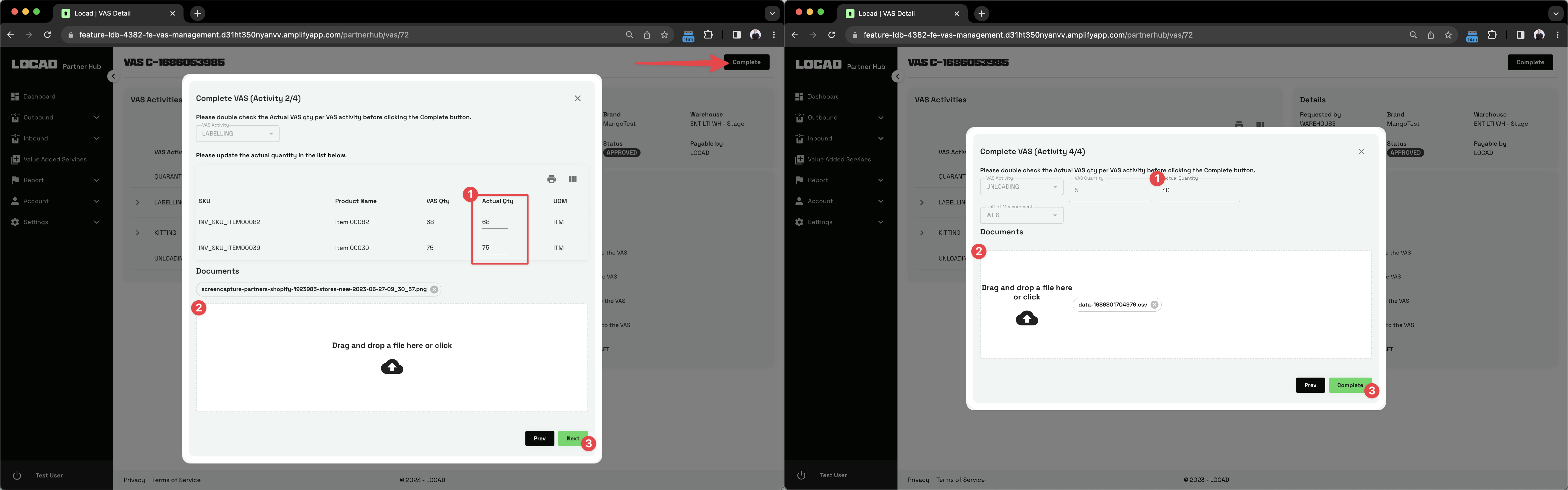
In the VAS details page, click the Complete button and do the following per VAS activity:
- [Optional] Edit the Actual Quantity
- [Optional] Add or remove documents
- Click the Next button or Complete button for the last VAS activity
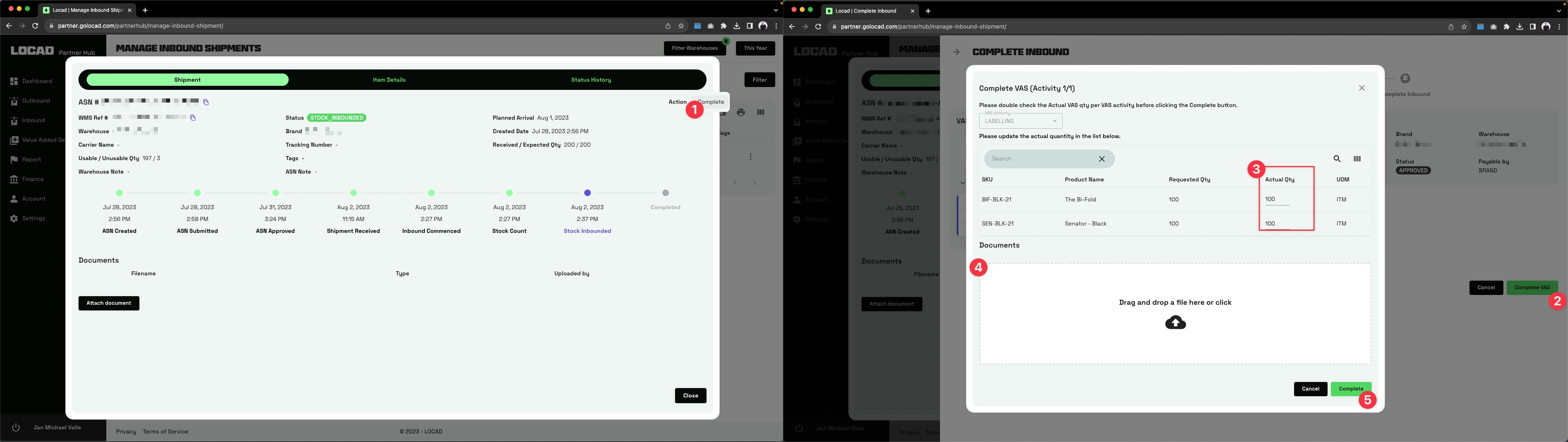
In the Manage Inbound Shipments page, search for the consignment and do the following:
- Click the Action button and select Complete.
- In the Complete Inbound page, click the Complete VAS button
- [Optional] Edit the Actual Quantity
- [Optional] Add or remove documents
- Click the Next button or Complete button for the last VAS activity
Was this article helpful?
That’s Great!
Thank you for your feedback
Sorry! We couldn't be helpful
Thank you for your feedback
Feedback sent
We appreciate your effort and will try to fix the article